> ## Documentation Index
> Fetch the complete documentation index at: https://docs.salesbricks.com/llms.txt
> Use this file to discover all available pages before exploring further.
# Overview
When implementing a usage-based plan on Salesbricks, your customers are charged based on the quantity / count used over a certain period, referred to as **Final value** in the UI.
## Counter / Final value
With **final value** measurement, tally up all billable events over a set time period. This approach is suitable for measuring cumulative usage, such as the total number of API calls in a month.
### Example
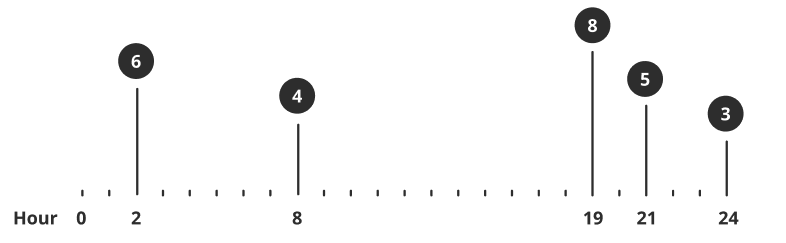 Calculation is `sum(billable events) * unit price = total`.
In the illustrated graph,
(6 + 4 + 8 + 5 + 3) \* \$2 = \$52
### Use cases
Number of API calls used in a month.
Count of document exports by a customer.
Total service requests made by a client.
## Simple API Calls
Integrating usage data with Salesbricks requires just one simple API call:
`https://api.salesbricks.com/api/v2/usage`
Learn more about using your Public API token to authenticate API calls: [Authentication](/api-reference/getting-started/authentication)
Calculation is `sum(billable events) * unit price = total`.
In the illustrated graph,
(6 + 4 + 8 + 5 + 3) \* \$2 = \$52
### Use cases
Number of API calls used in a month.
Count of document exports by a customer.
Total service requests made by a client.
## Simple API Calls
Integrating usage data with Salesbricks requires just one simple API call:
`https://api.salesbricks.com/api/v2/usage`
Learn more about using your Public API token to authenticate API calls: [Authentication](/api-reference/getting-started/authentication)