> ## Documentation Index
> Fetch the complete documentation index at: https://docs.salesbricks.com/llms.txt
> Use this file to discover all available pages before exploring further.
# Usage Pools
> Let several usage bricks draw from one shared bucket of units
## Overview
A **usage pool** lets multiple usage bricks draw down from a single shared bucket of units. Instead of pricing and committing to each metered activity separately, your customer buys (or is billed for) one pool of units, and each pooled brick consumes from it at its own individual rate.
This is the model behind "credits" pricing. For example, a company might sell **credits** where a text request consumes 1 credit, an image generation consumes 5 credits, and a video generation consumes 50 credits. The customer commits to 100,000 credits for the year, and all three activities burn down the same balance at different rates.
A pool can be billed in one of two ways:
| Billing mode | How the customer pays | Overage |
| ------------------ | ---------------------------------------------------------------------------------------------------------------- | ------------------------------------------------------------------ |
| **Pre-commitment** | Buys a fixed number of pool units upfront, at the start of each reset period | Units consumed beyond the commitment are billed monthly in arrears |
| **Pay as you go** | Billed monthly in arrears for the pool units actually consumed, with an optional **minimum monthly price** floor | None. There is no commitment to exceed |
Usage pools are enabled per account. If you don't see the **Set brick as usage pool** checkbox when creating a usage brick, ping us in your dedicated Slack channel or email [support@salesbricks.com](mailto:support@salesbricks.com). Pay as you go pools are enabled separately from pre-commitment pools.
## Key concepts
| Term | What it means |
| -------------------------- | ----------------------------------------------------------------------------------------------------------------------------------------------------------------------------------------------------------------------- |
| **Pool brick** | A usage brick flagged as a usage pool. It is the brick your customer selects on the order, and the one that appears on invoices. Usage is never recorded against it directly. |
| **Pooled brick** | A regular usage brick that has been added to a pool. Usage is recorded against pooled bricks, and each event is converted to pool units and deducted from the pool. |
| **Pool base rate** | The price of one pool unit, set per currency on the pool brick's pricing. In pre-commitment mode this is the upfront rate. In pay-as-you-go mode it is the arrears rate. |
| **Pool unit rate** | Set per pooled brick. How many pool units one raw unit of that brick consumes. A pool unit rate of 5 means each recorded unit deducts 5 units from the pool. Fractional rates like 0.25 are allowed. |
| **Overage unit rate** | Pre-commitment only. Set per pooled brick. Once the pool is exhausted, each raw unit of overage is charged at overage unit rate × pool base rate. |
| **Default pre-commitment** | Pre-commitment only. The number of pool units the order builder pre-fills when the pool is added to an order. Sellers can change it per order. |
| **Reset schedule** | Pre-commitment only. How often the commitment is billed and the balance resets: **Monthly**, **Quarterly**, **Semi-annually**, **Annually**, or **Contract period** (one commitment metered across the whole contract). |
| **Minimum monthly price** | Pay as you go only. If the month's pool usage costs less than this amount, the customer is billed the minimum instead. |
## Setup
Create a new brick with the **Usage** schedule. Check **Set brick as usage pool**.
Give the brick a name and unit text that describe the shared resource, for example "Usage Credits" with a custom unit of "credit". The unit text appears on the order form and invoices next to the committed quantity.
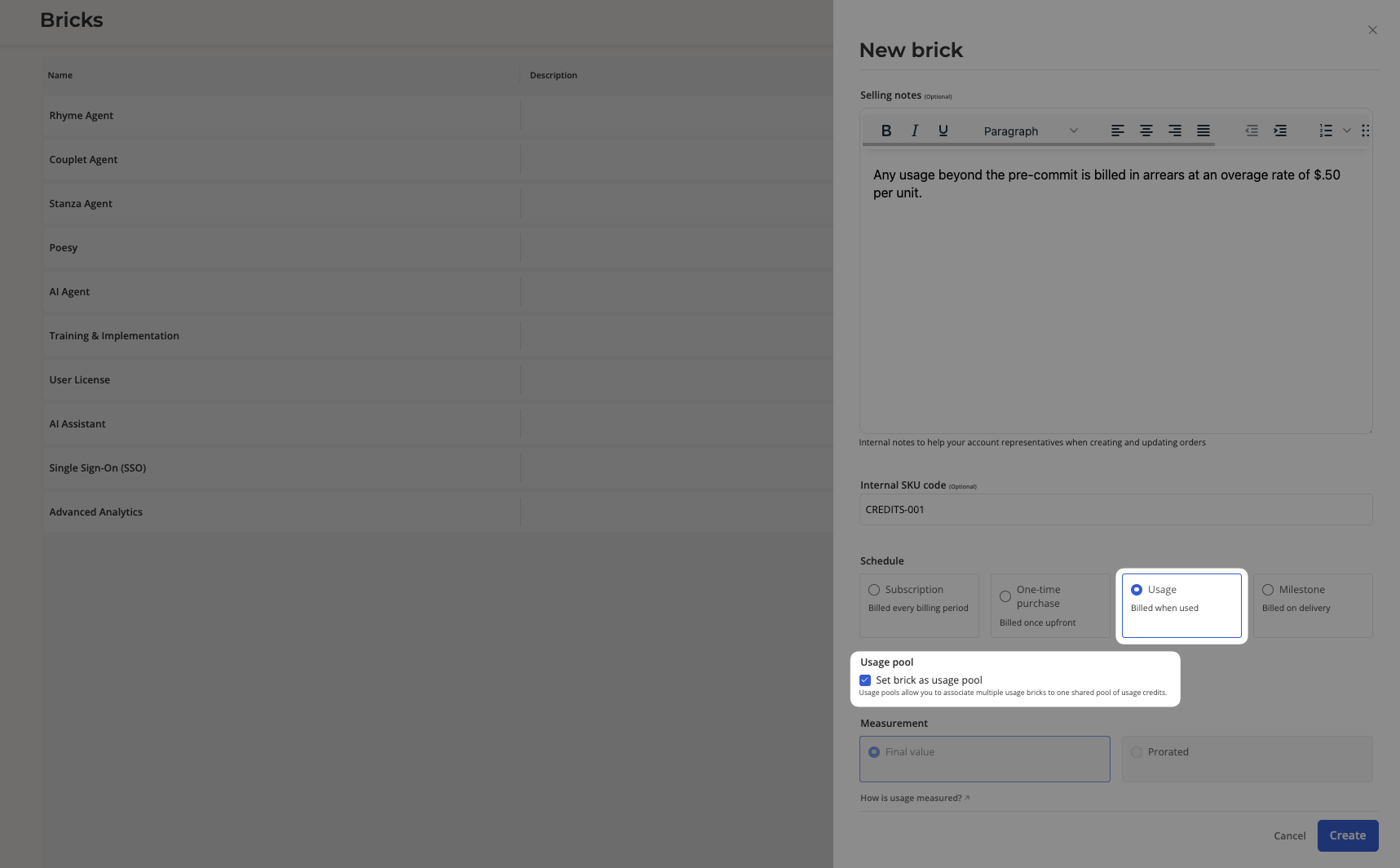 The usage pool flag can only be set when the brick is created. It cannot be toggled on an existing brick. A pool brick's measurement is locked to **Final value**, since it aggregates its pooled bricks' totals.
Create one regular **Usage** brick for each activity that will draw from the pool, for example "Text requests", "Image generations", and "Video generations". If you already have usage bricks for these, you can reuse them.
Pooled bricks are metered as whole-unit counts. You record raw events against them (one image generated, one request served) and the pool unit rate handles the conversion to pool units.
Go to Products, select a product, then a plan, and click the edit icon. Scroll to the "Bricks" section, click **Edit bricks**, and add the pool brick as an add-on.
Hover over the pool brick and click the edit icon to open **Pool brick pricing and packaging**.
Select **Pre-commitment** (paid at the beginning of the billing period) or **Pay as you go** (paid monthly in arrears). The two modes are mutually exclusive on a given pricing.
The usage pool flag can only be set when the brick is created. It cannot be toggled on an existing brick. A pool brick's measurement is locked to **Final value**, since it aggregates its pooled bricks' totals.
Create one regular **Usage** brick for each activity that will draw from the pool, for example "Text requests", "Image generations", and "Video generations". If you already have usage bricks for these, you can reuse them.
Pooled bricks are metered as whole-unit counts. You record raw events against them (one image generated, one request served) and the pool unit rate handles the conversion to pool units.
Go to Products, select a product, then a plan, and click the edit icon. Scroll to the "Bricks" section, click **Edit bricks**, and add the pool brick as an add-on.
Hover over the pool brick and click the edit icon to open **Pool brick pricing and packaging**.
Select **Pre-commitment** (paid at the beginning of the billing period) or **Pay as you go** (paid monthly in arrears). The two modes are mutually exclusive on a given pricing.
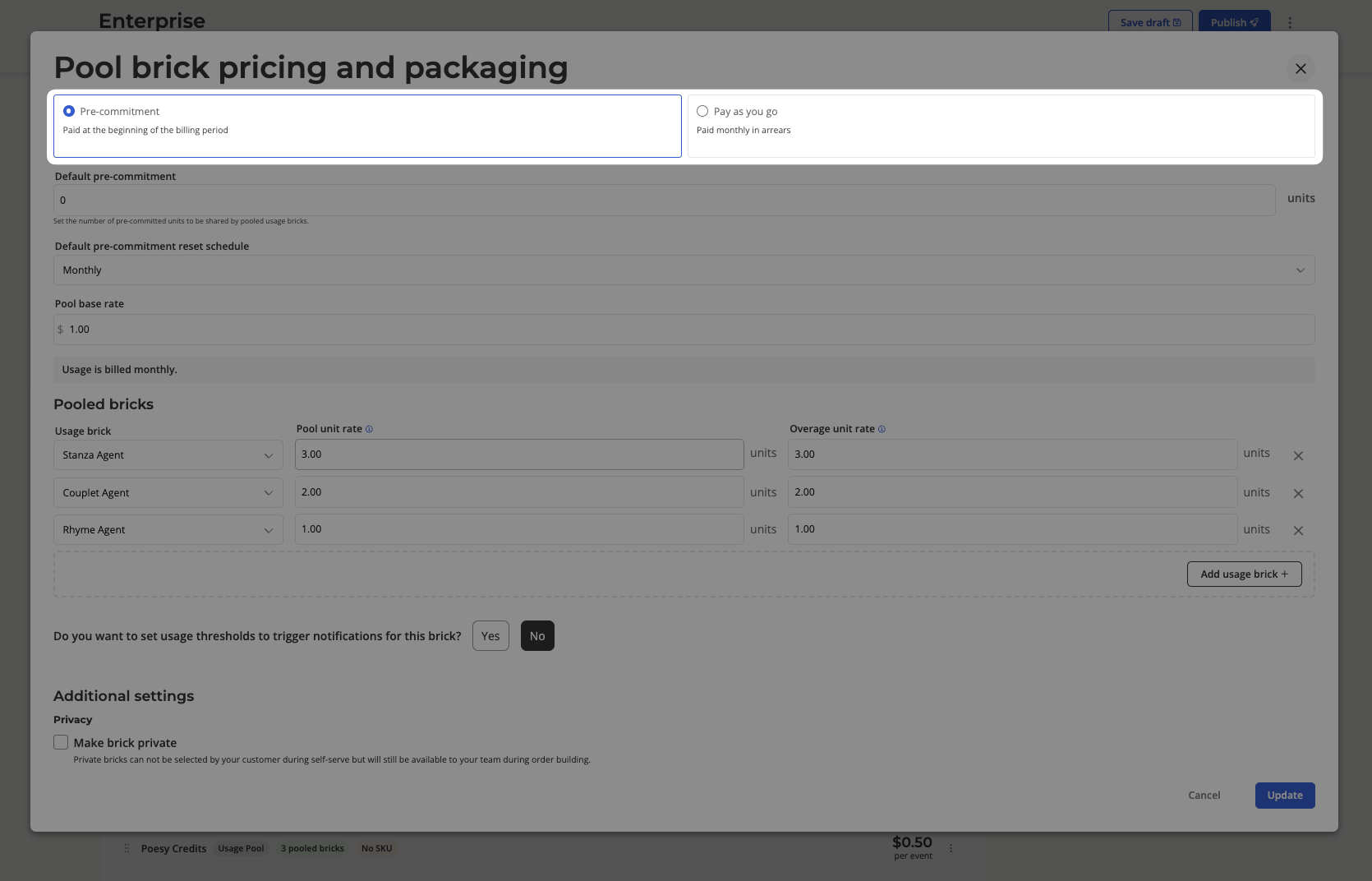 * **Default pre-commitment**: the number of pool units to pre-fill on new orders.
* **Default pre-commitment reset schedule**: Monthly, Quarterly, Semi-annually, Annually, or Contract period.
* **Minimum monthly price**: the smallest amount billed each month. Leave it empty for no floor.
Enter the **Pool base rate** for each currency the plan supports. This is the price of one pool unit.
Under the pooled bricks table, click **Add usage brick** for each brick that should draw from the pool and set:
* **Pool unit rate**: pool units consumed per raw unit of this brick.
* **Overage unit rate** (pre-commitment only): the multiplier applied to the pool base rate for each raw unit billed as overage.
* **Default pre-commitment**: the number of pool units to pre-fill on new orders.
* **Default pre-commitment reset schedule**: Monthly, Quarterly, Semi-annually, Annually, or Contract period.
* **Minimum monthly price**: the smallest amount billed each month. Leave it empty for no floor.
Enter the **Pool base rate** for each currency the plan supports. This is the price of one pool unit.
Under the pooled bricks table, click **Add usage brick** for each brick that should draw from the pool and set:
* **Pool unit rate**: pool units consumed per raw unit of this brick.
* **Overage unit rate** (pre-commitment only): the multiplier applied to the pool base rate for each raw unit billed as overage.
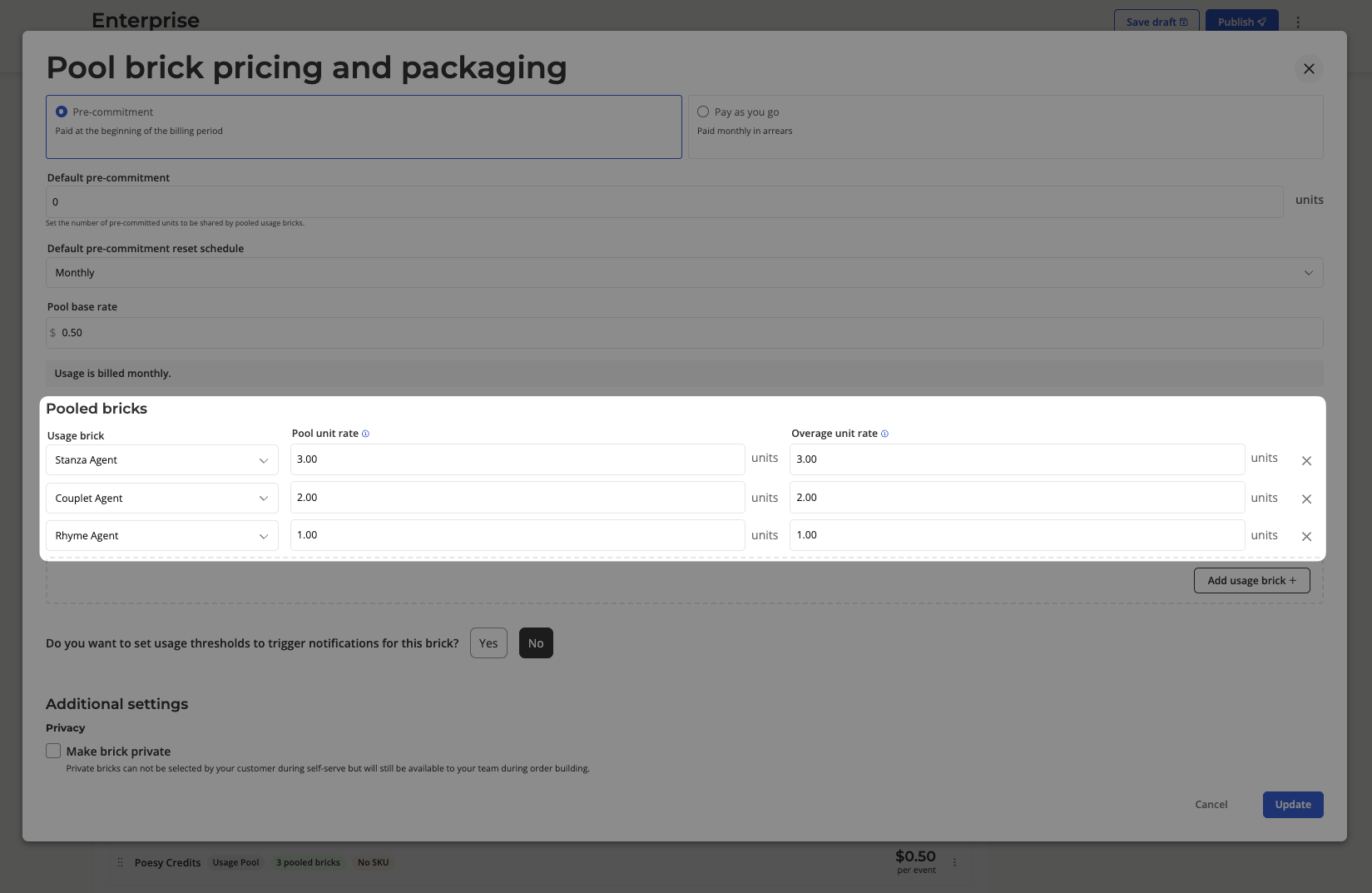 A pool must contain at least one usage brick before it can be saved. A usage brick can only belong to one pool on a plan, and bricks already in a pool are not offered again in the picker.
Save the pricing, then publish the plan version. Pooled bricks are added to the plan automatically as part of the pool. They do not appear as separate add-ons on the plan, and their pricing is derived from the pool.
## How pre-commitment pools bill
The customer commits to a number of pool units per reset period and pays for them upfront at the pool base rate. As usage is recorded against pooled bricks, each event is converted to pool units (raw count × pool unit rate) and deducted from the remaining balance for the current period.
Once the balance reaches zero, further usage is overage. Each raw unit of overage on a pooled brick is charged at that brick's overage unit rate × pool base rate, and billed in arrears on the monthly usage invoice.
**Example**
| Setting | Value |
| ----------------- | ---------------------------------- |
| Pool base rate | \$0.10 per credit |
| Commitment | 10,000 credits, resets **Monthly** |
| Text requests | Pool unit rate 1, overage rate 1 |
| Image generations | Pool unit rate 5, overage rate 6 |
In one month the customer records 6,000 text requests and 1,000 image generations.
* Upfront charge for the month: 10,000 × \$0.10 = **\$1,000.00**
* Pool units consumed: (6,000 × 1) + (1,000 × 5) = 11,000 credits
* Overage: 1,000 credits over the commitment
* Overage is attributed to whichever pooled brick's events crossed the limit. If the last 200 image generations landed after the pool was exhausted, that is 200 raw units × 6 × \$0.10 = **\$120.00** billed in arrears on the usage invoice.
The **Contract period** schedule meters a single commitment across the whole contract. The periodic schedules (Monthly, Quarterly, Semi-annually, Annually) reset the balance at the start of each period. Unused units do not roll over.
Pre-commitments on a pool support [ramping structures](/orders/ramping-structures), so the committed quantity and rate can change across the term. When a ramp is added, the pool unit rate and overage unit rate of each pooled brick can also be overridden per ramp period.
## How pay-as-you-go pools bill
There is no upfront commitment. At the end of each month, Salesbricks sums the pool units consumed across all pooled bricks and multiplies by the pool base rate. If a **minimum monthly price** is set and the month's usage cost falls below it, the customer is billed the minimum instead.
**Monthly charge = max(pool units consumed × pool base rate, minimum monthly price)**
**Example**
| Setting | Value |
| --------------------- | ----------------- |
| Pool base rate | \$0.10 per credit |
| Minimum monthly price | \$500.00 |
| Text requests | Pool unit rate 1 |
| Image generations | Pool unit rate 5 |
* **Light month**: 2,000 text requests and 200 image generations = 3,000 credits × \$0.10 = \$300.00. Below the floor, so the customer is billed **\$500.00**.
* **Heavy month**: 6,000 text requests and 1,000 image generations = 11,000 credits × \$0.10 = **\$1,100.00**. Above the floor, so the customer is billed actual usage.
Pay-as-you-go pool usage is always invoiced monthly, even when the rest of the order bills annually or quarterly.
## Building an order
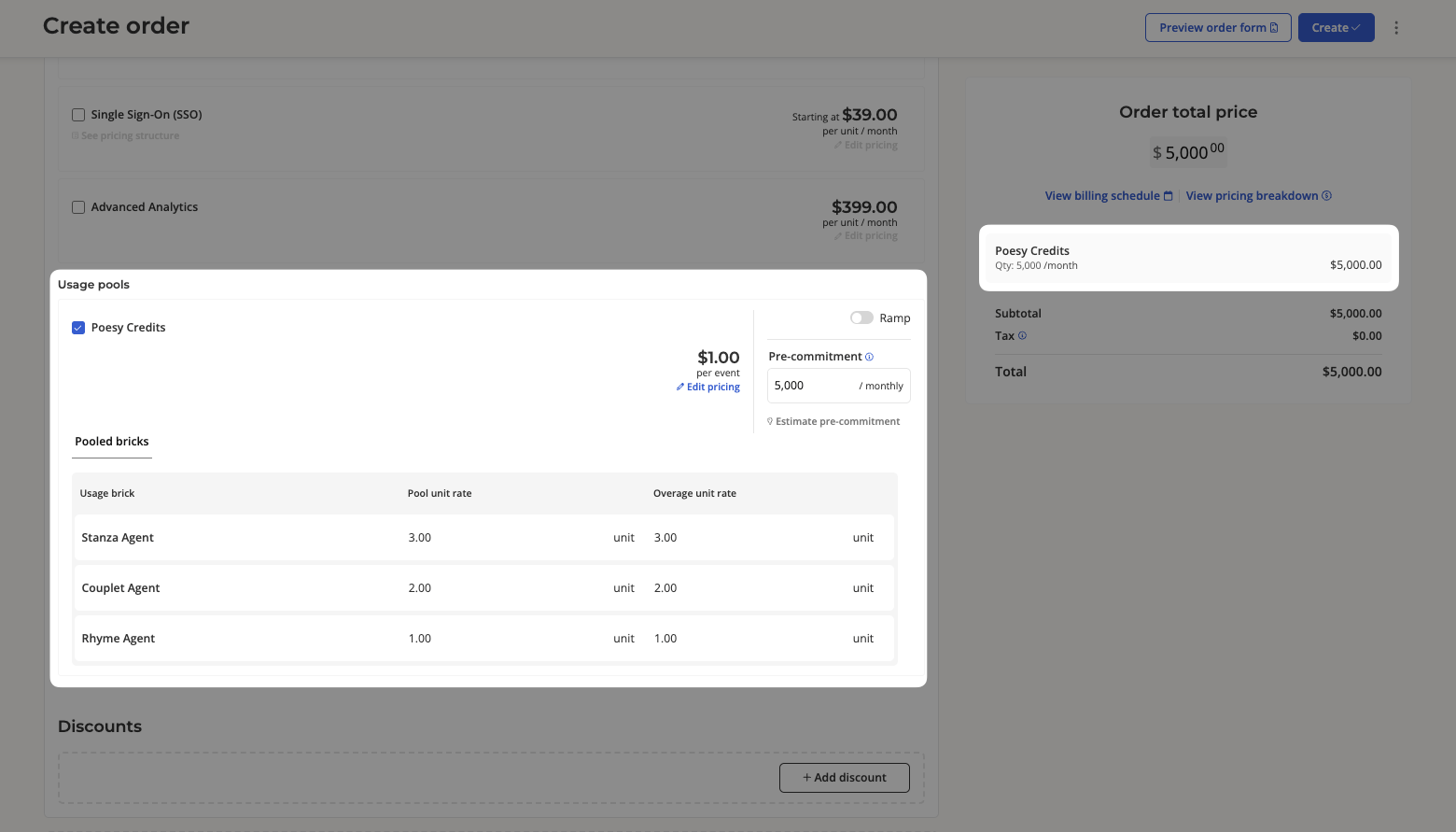
When a plan includes a usage pool, the order builder shows a **Usage pools** section. Select the pool to add it to the order.
* For **pre-commitment** pools, the quantity input is pre-filled with the default pre-commitment. Adjust it for the deal, or click **Estimate pre-commitments** to suggest a quantity from expected usage of each pooled brick.
* For **pay as you go** pools there is no quantity to set.
* The **Pooled bricks** tab under the pool lists each pooled brick with its pool unit rate (and overage unit rate for pre-commitment pools).
A pool must contain at least one usage brick before it can be saved. A usage brick can only belong to one pool on a plan, and bricks already in a pool are not offered again in the picker.
Save the pricing, then publish the plan version. Pooled bricks are added to the plan automatically as part of the pool. They do not appear as separate add-ons on the plan, and their pricing is derived from the pool.
## How pre-commitment pools bill
The customer commits to a number of pool units per reset period and pays for them upfront at the pool base rate. As usage is recorded against pooled bricks, each event is converted to pool units (raw count × pool unit rate) and deducted from the remaining balance for the current period.
Once the balance reaches zero, further usage is overage. Each raw unit of overage on a pooled brick is charged at that brick's overage unit rate × pool base rate, and billed in arrears on the monthly usage invoice.
**Example**
| Setting | Value |
| ----------------- | ---------------------------------- |
| Pool base rate | \$0.10 per credit |
| Commitment | 10,000 credits, resets **Monthly** |
| Text requests | Pool unit rate 1, overage rate 1 |
| Image generations | Pool unit rate 5, overage rate 6 |
In one month the customer records 6,000 text requests and 1,000 image generations.
* Upfront charge for the month: 10,000 × \$0.10 = **\$1,000.00**
* Pool units consumed: (6,000 × 1) + (1,000 × 5) = 11,000 credits
* Overage: 1,000 credits over the commitment
* Overage is attributed to whichever pooled brick's events crossed the limit. If the last 200 image generations landed after the pool was exhausted, that is 200 raw units × 6 × \$0.10 = **\$120.00** billed in arrears on the usage invoice.
The **Contract period** schedule meters a single commitment across the whole contract. The periodic schedules (Monthly, Quarterly, Semi-annually, Annually) reset the balance at the start of each period. Unused units do not roll over.
Pre-commitments on a pool support [ramping structures](/orders/ramping-structures), so the committed quantity and rate can change across the term. When a ramp is added, the pool unit rate and overage unit rate of each pooled brick can also be overridden per ramp period.
## How pay-as-you-go pools bill
There is no upfront commitment. At the end of each month, Salesbricks sums the pool units consumed across all pooled bricks and multiplies by the pool base rate. If a **minimum monthly price** is set and the month's usage cost falls below it, the customer is billed the minimum instead.
**Monthly charge = max(pool units consumed × pool base rate, minimum monthly price)**
**Example**
| Setting | Value |
| --------------------- | ----------------- |
| Pool base rate | \$0.10 per credit |
| Minimum monthly price | \$500.00 |
| Text requests | Pool unit rate 1 |
| Image generations | Pool unit rate 5 |
* **Light month**: 2,000 text requests and 200 image generations = 3,000 credits × \$0.10 = \$300.00. Below the floor, so the customer is billed **\$500.00**.
* **Heavy month**: 6,000 text requests and 1,000 image generations = 11,000 credits × \$0.10 = **\$1,100.00**. Above the floor, so the customer is billed actual usage.
Pay-as-you-go pool usage is always invoiced monthly, even when the rest of the order bills annually or quarterly.
## Building an order
When a plan includes a usage pool, the order builder shows a **Usage pools** section. Select the pool to add it to the order.
* For **pre-commitment** pools, the quantity input is pre-filled with the default pre-commitment. Adjust it for the deal, or click **Estimate pre-commitments** to suggest a quantity from expected usage of each pooled brick.
* For **pay as you go** pools there is no quantity to set.
* The **Pooled bricks** tab under the pool lists each pooled brick with its pool unit rate (and overage unit rate for pre-commitment pools).
 Selecting a pool removes any of its pooled bricks that were added to the order individually. A pooled brick cannot be sold standalone alongside its pool in the same phase. On [multi-phase orders](/orders/order-phases), this check is per phase, so a pool in one phase and one of its member bricks sold on its own in another phase is allowed.
On the order form and in the pricing breakdown, the pool appears as a single line with the committed quantity (or the minimum monthly price), followed by a sub-table of pooled bricks showing each brick's effective rate (pool unit rate × pool base rate) and, for pre-commitment pools, its overage rate.
## Recording usage
Record usage against the **pooled bricks**, not the pool brick. Send each event through the [usage endpoint](/api-reference/usage/post) with the pooled brick's `brick_id`, or record it manually from the subscription's usage page. A usage entry that targets the pool brick itself is rejected.
Each event is converted to pool units at ingestion (raw count × pool unit rate) and deducted from the pool.
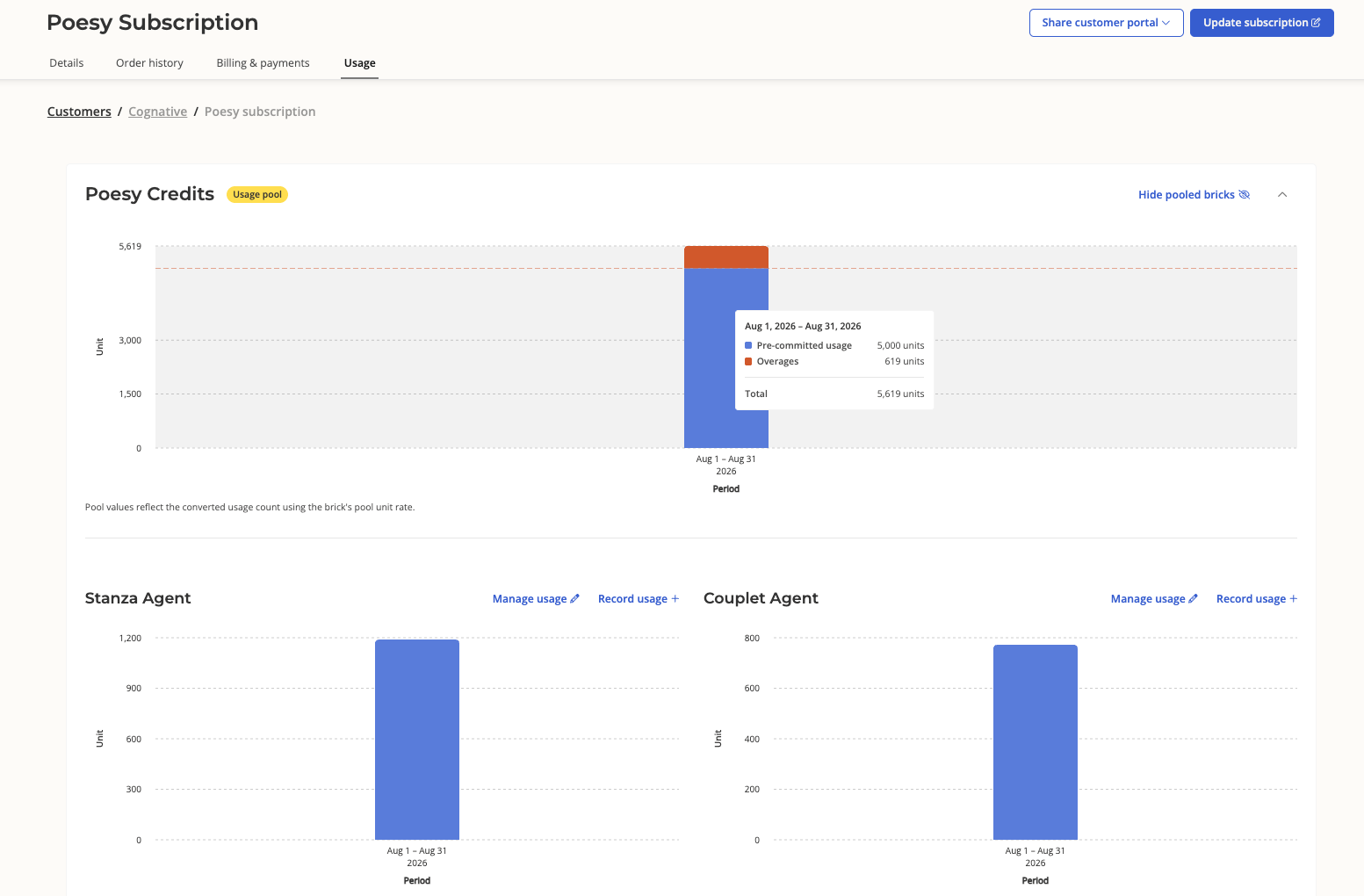
On the subscription's **Usage** page, the pool appears as a card with a **Usage pool** badge. Its chart shows the consolidated pool balance in pool units. Click **Show pooled bricks** to expand a chart for each pooled brick in its own raw units, with **Record usage** and **Manage usage** actions for each.
Selecting a pool removes any of its pooled bricks that were added to the order individually. A pooled brick cannot be sold standalone alongside its pool in the same phase. On [multi-phase orders](/orders/order-phases), this check is per phase, so a pool in one phase and one of its member bricks sold on its own in another phase is allowed.
On the order form and in the pricing breakdown, the pool appears as a single line with the committed quantity (or the minimum monthly price), followed by a sub-table of pooled bricks showing each brick's effective rate (pool unit rate × pool base rate) and, for pre-commitment pools, its overage rate.
## Recording usage
Record usage against the **pooled bricks**, not the pool brick. Send each event through the [usage endpoint](/api-reference/usage/post) with the pooled brick's `brick_id`, or record it manually from the subscription's usage page. A usage entry that targets the pool brick itself is rejected.
Each event is converted to pool units at ingestion (raw count × pool unit rate) and deducted from the pool.
On the subscription's **Usage** page, the pool appears as a card with a **Usage pool** badge. Its chart shows the consolidated pool balance in pool units. Click **Show pooled bricks** to expand a chart for each pooled brick in its own raw units, with **Record usage** and **Manage usage** actions for each.
 ## Invoices
* **Pre-commitment**: the upfront invoice for each reset period carries one line for the pool at the committed quantity. Overage appears on the monthly usage invoice as a line per pooled brick that went over, in that brick's raw units at its overage rate.
* **Pay as you go**: when usage for the month is below the minimum monthly price, the usage invoice shows one line for the pool at the minimum. When usage exceeds the minimum, the invoice shows a line per pooled brick with its raw quantity and effective rate.
## Usage alerts
[Usage alerts](/catalog/usage-alerts) for a pool are configured on the **pool brick** and evaluate the **pre-committed** threshold type, for example "the customer has used 90% of their committed credits". Usage recorded against any pooled brick counts toward the pool's thresholds. Units and monetary thresholds are not evaluated for pooled usage.
## Things to know
* **The pool flag is permanent.** Decide at brick creation whether a brick is a pool. To convert an existing usage brick into a pool, create a new brick.
* **Pool bricks always use Final value measurement.** Pooled bricks are metered as whole-unit counts, so the Monetary unit type does not apply to pools.
* **Minimum required units are not supported on pools.** Use a pay-as-you-go pool with a minimum monthly price instead.
* **Pricing is per plan version.** Changing a pool's base rate, pooled bricks, or unit rates means publishing a new plan version. Existing subscriptions keep the pricing they closed on.
* **Archiving a pooled brick removes it from its pools.** The archive dialog lists the pools and plans that will be affected. You cannot archive a pool's only member; add another brick or remove the pool first.
* **Removing a pool from a plan also removes its pooled bricks** from that plan, since their pricing is derived from the pool.
* **API.** When creating a subscription through the API, pass the pool brick's `brick_id` in the bricks list. Pooled bricks cannot be passed alongside their pool. Usage reporting endpoints return pool bricks in pool units, with overage reported on the individual pooled bricks.
## Related topics
- [Retrieve brick usage time series](/api-reference/usage/retrieve-brick-usage-time-series.md)
- [Order Phases](/orders/order-phases.md)
- [Retrieve brick usage](/api-reference/usage/retrieve-brick-usage.md)
## Invoices
* **Pre-commitment**: the upfront invoice for each reset period carries one line for the pool at the committed quantity. Overage appears on the monthly usage invoice as a line per pooled brick that went over, in that brick's raw units at its overage rate.
* **Pay as you go**: when usage for the month is below the minimum monthly price, the usage invoice shows one line for the pool at the minimum. When usage exceeds the minimum, the invoice shows a line per pooled brick with its raw quantity and effective rate.
## Usage alerts
[Usage alerts](/catalog/usage-alerts) for a pool are configured on the **pool brick** and evaluate the **pre-committed** threshold type, for example "the customer has used 90% of their committed credits". Usage recorded against any pooled brick counts toward the pool's thresholds. Units and monetary thresholds are not evaluated for pooled usage.
## Things to know
* **The pool flag is permanent.** Decide at brick creation whether a brick is a pool. To convert an existing usage brick into a pool, create a new brick.
* **Pool bricks always use Final value measurement.** Pooled bricks are metered as whole-unit counts, so the Monetary unit type does not apply to pools.
* **Minimum required units are not supported on pools.** Use a pay-as-you-go pool with a minimum monthly price instead.
* **Pricing is per plan version.** Changing a pool's base rate, pooled bricks, or unit rates means publishing a new plan version. Existing subscriptions keep the pricing they closed on.
* **Archiving a pooled brick removes it from its pools.** The archive dialog lists the pools and plans that will be affected. You cannot archive a pool's only member; add another brick or remove the pool first.
* **Removing a pool from a plan also removes its pooled bricks** from that plan, since their pricing is derived from the pool.
* **API.** When creating a subscription through the API, pass the pool brick's `brick_id` in the bricks list. Pooled bricks cannot be passed alongside their pool. Usage reporting endpoints return pool bricks in pool units, with overage reported on the individual pooled bricks.
## Related topics
- [Retrieve brick usage time series](/api-reference/usage/retrieve-brick-usage-time-series.md)
- [Order Phases](/orders/order-phases.md)
- [Retrieve brick usage](/api-reference/usage/retrieve-brick-usage.md)