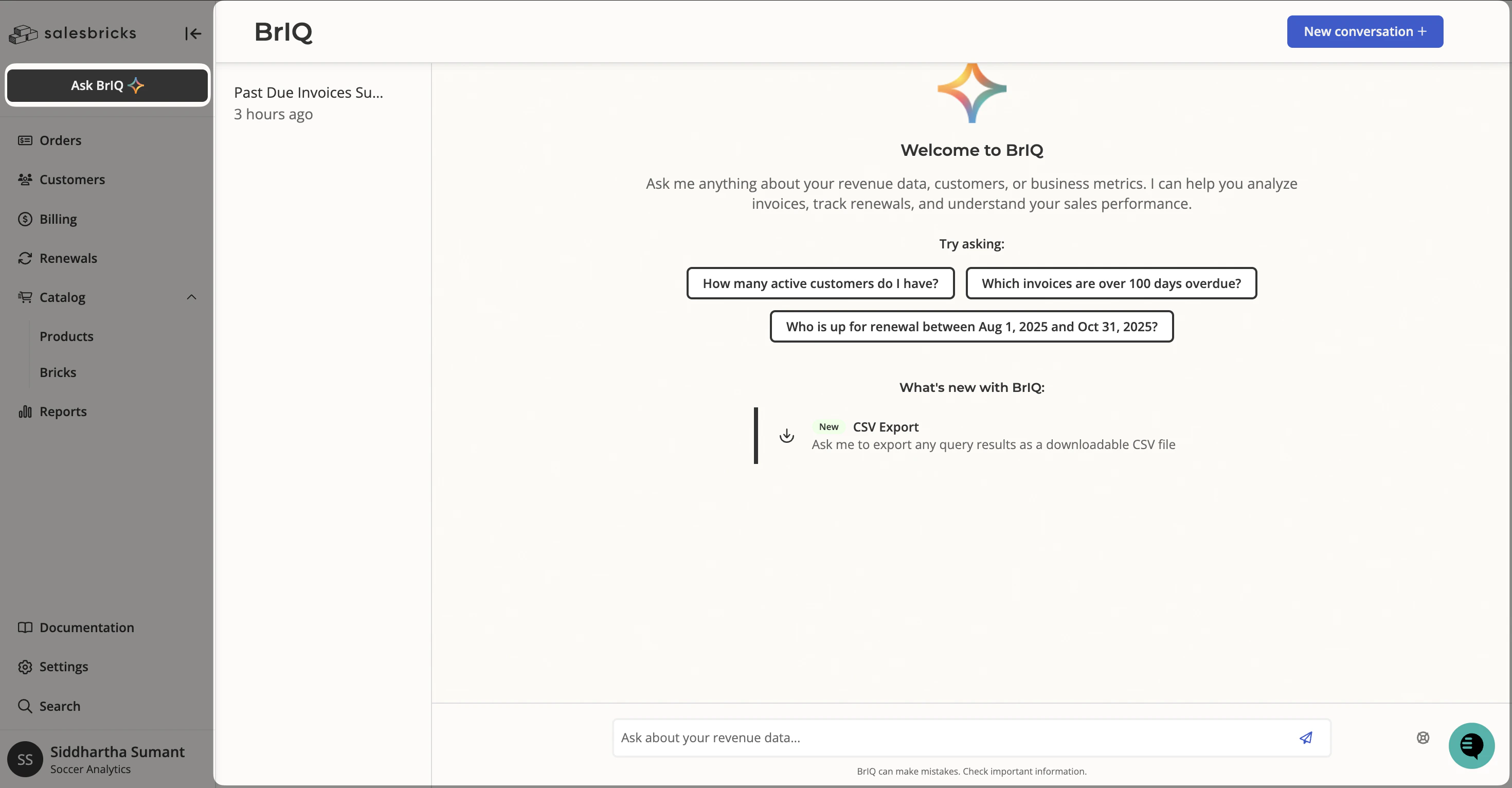
 * Type your question in the input bar and press Enter.
* Click ***New conversation +*** in the top-right corner to start a fresh chat at any time.
* Your previous conversations are listed in the left panel so you can return to them.
## What you can ask BrIQ
BrIQ can answer a wide range of questions about invoices, customers, and revenue. Below are some common use cases with example prompts you can use as a starting point.
### Invoice tracking
Use BrIQ to quickly surface outstanding or overdue invoices — across all customers or for a specific one.
**Example prompts:**
* *"Show me all past due invoices"*
* *"What are \[Insert Company] outstanding invoices? Include the invoice number, amount due, due date, days past due, and payment link."*
* *"Which customers have the most unpaid invoices?"*
* *"Show me invoices past due more than 90 days"*
BrIQ will return a structured list with key details and direct links so you can take action immediately.
### Revenue reporting
Ask BrIQ about revenue for a specific time period and it will return MRR totals, a customer-by-customer breakdown, and a narrative summary with key highlights.
**Example prompts:**
* *"How much revenue was generated this month?"*
* *"Compare this month's revenue to last month"*
BrIQ returns the total MRR for the period, how many customers contributed, and a ranked breakdown by customer. From there, you can ask follow-up questions to go deeper — for example, drilling into invoice status (Paid, Outstanding, Past Due), which customers are new, or which products are driving growth.
### Customer billing history
Look up a specific customer's billing picture without leaving the chat.
**Example prompts:**
* *"Show all invoices for \[Customer Name]"*
* *"What is \[Customer]'s renewal date and current spend?"*
* *"Pull all invoices for \[Customer] including paid ones"*
BrIQ will link directly to the customer page in Salesbricks so you can drill in further if needed.
## How BrIQ presents answers
BrIQ formats its answers to be easy to scan and act on:
* **Tables** — For invoice lists or revenue breakdowns, BrIQ organizes data into a structured table with relevant columns.
* **Narrative summary** — After any table, BrIQ provides a short written summary with key highlights (e.g., total billed, total collected, % paid).
* **Direct links** — BrIQ includes clickable links to customer pages and invoice payment pages within its responses.
* **Suggested follow-ups** — At the end of each response, BrIQ offers a few suggested next questions to help you keep exploring.
## Tips for better results
**Be specific about what you want.** If you want a table in a specific format, say so. For example: *"Show \[Company]'s outstanding invoices as a bulleted list with invoice number, amount due, due date, days past due, and payment link."*
**Use the customer's exact name.** If BrIQ doesn't find a match, it may return no results or suggest similar names. Try the name exactly as it appears in Salesbricks.
**Ask follow-up questions.** BrIQ remembers the context of your conversation. You can follow up with *"Now show me the same for last month"* or *"Which of those are more than 60 days overdue?"* without repeating yourself.
**Use the suggested prompts.** After each response, BrIQ surfaces relevant follow-up questions. Clicking one of these is a quick way to drill deeper without typing.
## What BrIQ can't do
BrIQ is a read-only data assistant — it can look things up and surface insights, but it cannot make changes in Salesbricks. Here are some common requests that BrIQ will decline and redirect you to handle manually:
* Type your question in the input bar and press Enter.
* Click ***New conversation +*** in the top-right corner to start a fresh chat at any time.
* Your previous conversations are listed in the left panel so you can return to them.
## What you can ask BrIQ
BrIQ can answer a wide range of questions about invoices, customers, and revenue. Below are some common use cases with example prompts you can use as a starting point.
### Invoice tracking
Use BrIQ to quickly surface outstanding or overdue invoices — across all customers or for a specific one.
**Example prompts:**
* *"Show me all past due invoices"*
* *"What are \[Insert Company] outstanding invoices? Include the invoice number, amount due, due date, days past due, and payment link."*
* *"Which customers have the most unpaid invoices?"*
* *"Show me invoices past due more than 90 days"*
BrIQ will return a structured list with key details and direct links so you can take action immediately.
### Revenue reporting
Ask BrIQ about revenue for a specific time period and it will return MRR totals, a customer-by-customer breakdown, and a narrative summary with key highlights.
**Example prompts:**
* *"How much revenue was generated this month?"*
* *"Compare this month's revenue to last month"*
BrIQ returns the total MRR for the period, how many customers contributed, and a ranked breakdown by customer. From there, you can ask follow-up questions to go deeper — for example, drilling into invoice status (Paid, Outstanding, Past Due), which customers are new, or which products are driving growth.
### Customer billing history
Look up a specific customer's billing picture without leaving the chat.
**Example prompts:**
* *"Show all invoices for \[Customer Name]"*
* *"What is \[Customer]'s renewal date and current spend?"*
* *"Pull all invoices for \[Customer] including paid ones"*
BrIQ will link directly to the customer page in Salesbricks so you can drill in further if needed.
## How BrIQ presents answers
BrIQ formats its answers to be easy to scan and act on:
* **Tables** — For invoice lists or revenue breakdowns, BrIQ organizes data into a structured table with relevant columns.
* **Narrative summary** — After any table, BrIQ provides a short written summary with key highlights (e.g., total billed, total collected, % paid).
* **Direct links** — BrIQ includes clickable links to customer pages and invoice payment pages within its responses.
* **Suggested follow-ups** — At the end of each response, BrIQ offers a few suggested next questions to help you keep exploring.
## Tips for better results
**Be specific about what you want.** If you want a table in a specific format, say so. For example: *"Show \[Company]'s outstanding invoices as a bulleted list with invoice number, amount due, due date, days past due, and payment link."*
**Use the customer's exact name.** If BrIQ doesn't find a match, it may return no results or suggest similar names. Try the name exactly as it appears in Salesbricks.
**Ask follow-up questions.** BrIQ remembers the context of your conversation. You can follow up with *"Now show me the same for last month"* or *"Which of those are more than 60 days overdue?"* without repeating yourself.
**Use the suggested prompts.** After each response, BrIQ surfaces relevant follow-up questions. Clicking one of these is a quick way to drill deeper without typing.
## What BrIQ can't do
BrIQ is a read-only data assistant — it can look things up and surface insights, but it cannot make changes in Salesbricks. Here are some common requests that BrIQ will decline and redirect you to handle manually:
| Action | What to do instead |
|---|---|
| **Undo or reverse a manual payment** | Go to the invoice's Bill Statement page and use the payment options there, or contact Salesbricks Support. |
| **Create a new product or brick** | Use the product catalog in the Salesbricks admin UI to create and configure bricks. |
| **Create a proposal or order** | Use the order builder in Salesbricks to create a new order or proposal. |
| **Cancel or reverse an order** | Order changes need to be made directly in Salesbricks. Reach out to your support channel if you need help. |