> ## Documentation Index
> Fetch the complete documentation index at: https://docs.salesbricks.com/llms.txt
> Use this file to discover all available pages before exploring further.
# Monetary Usage Pricing
export const BetaFeatureBanner = () => <>
This feature is in beta
We're actively improving it, so some functionality may change before general release. To join the beta or send feedback, ping us in your dedicated Slack channel or email support@salesbricks.com.
;
## Overview
Monetary usage pricing lets a usage brick meter a **dollar amount** instead of a count of units, and price that amount as a **percentage**.
This is the model behind revenue share, take rates, payment processing fees, and any arrangement along the lines of "we charge 1.39% of everything that flows through the platform."
Pricing this way has always been possible in Salesbricks by setting a fractional per-unit rate and sending cents as the metered quantity. Monetary usage pricing makes it explicit: you choose dollars as the unit, you enter the rate as a percent, and every downstream surface (the brick pricing modal, the order form pricing breakdown, pre-commitments, invoices, and usage charts) displays it that way.
## Whole units vs. Monetary
Every usage brick's pricing now carries a **Unit type**. It controls how the quantity is entered and displayed, and which rate format goes with it.
| | Whole units | Monetary |
| ---------------------- | ------------------------------------------- | --------------------------------------------------- |
| **Quantity** | A discrete count, e.g. 1,000 nodes | A dollar amount, e.g. \$250,000 in processed volume |
| **Rate** | Currency per unit, e.g. \$0.05 per API call | Percentage of the metered amount, e.g. 1.39% |
| **Tier bounds** | Entered as counts | Entered as currency amounts |
| **Pricing structures** | Flat-rate, Tiered, Volume, Block | Flat-rate, Tiered, Volume |
**Unit type** only appears on **usage** bricks. Subscription, one-time, and milestone bricks are always priced in currency per unit.
## Setup
Go to Products, select a product, then a plan, and click the edit icon.
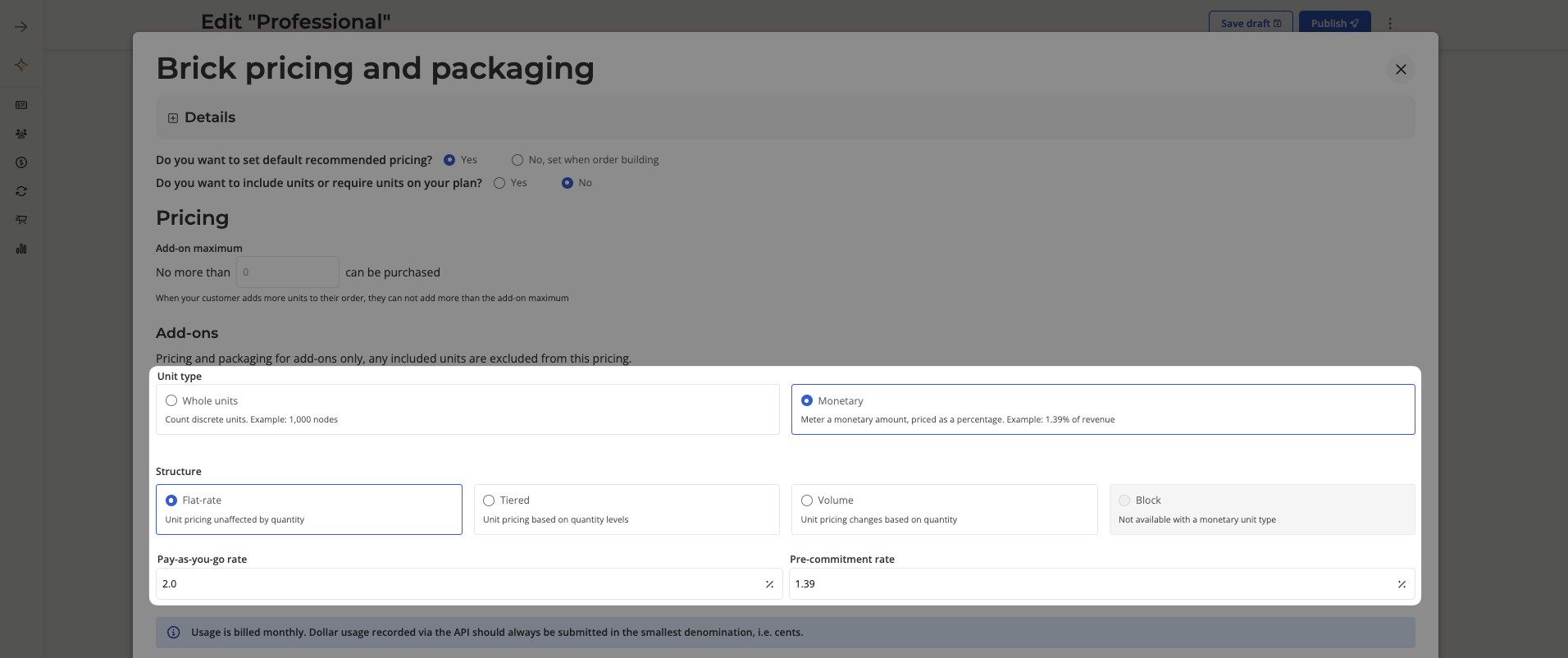
Scroll to the "Bricks" section and click **Edit bricks**. Hover over the usage brick you want to price and click the edit icon.
In the **Unit type** selector, choose **Monetary**.
Selecting Monetary automatically switches the rate format to a percentage.
 If you don't see a **Unit type** selector, monetary usage pricing isn't enabled for your account yet. Ping us in your dedicated Slack channel or email [support@salesbricks.com](mailto:support@salesbricks.com).
Choose **Flat-rate**, **Tiered**, or **Volume** (see [pricing structures](/quickstart-guide/products-plans-bricks/creating-a-plan#pricing-structures)), then enter the percentage rate. Fractional percentages are supported, so `1.39` is a valid rate.
For tiered and volume structures, the tier bounds are entered as dollar amounts rather than counts.
Save the brick pricing, then publish the plan version so the pricing is available to select on an order.
Monetary is not available with **Block** pricing. Block charges a flat fee per band rather than rate × quantity, so a percentage rate has nothing to multiply against. The two options disable each other in the modal, and the combination is rejected on save.
## Sending usage
Usage is always recorded in the **smallest denomination of the currency** (cents) through the same [usage endpoint](/api-reference/usage/post) you already use.
Salesbricks converts the stored count into a dollar amount for display, where **1 metered unit = 1 cent**.
| You want to record | Send as `quantity` |
| ------------------ | ------------------ |
| \$1,250.00 | `125000` |
| \$99.99 | `9999` |
| \$0.50 | `50` |
Sending `1250` when you meant \$1,250.00 records \$12.50. Double-check that your integration multiplies by 100 before posting.
## How the charge is calculated
The charge is the metered dollar amount multiplied by the rate.
**Charge = metered amount × (rate ÷ 100)**
**Flat-rate example**
* Metered amount for the month: \$250,000
* Rate: 1.39%
* Charge: \$250,000 × (1.39 ÷ 100) = **\$3,475.00**
**Tiered example**
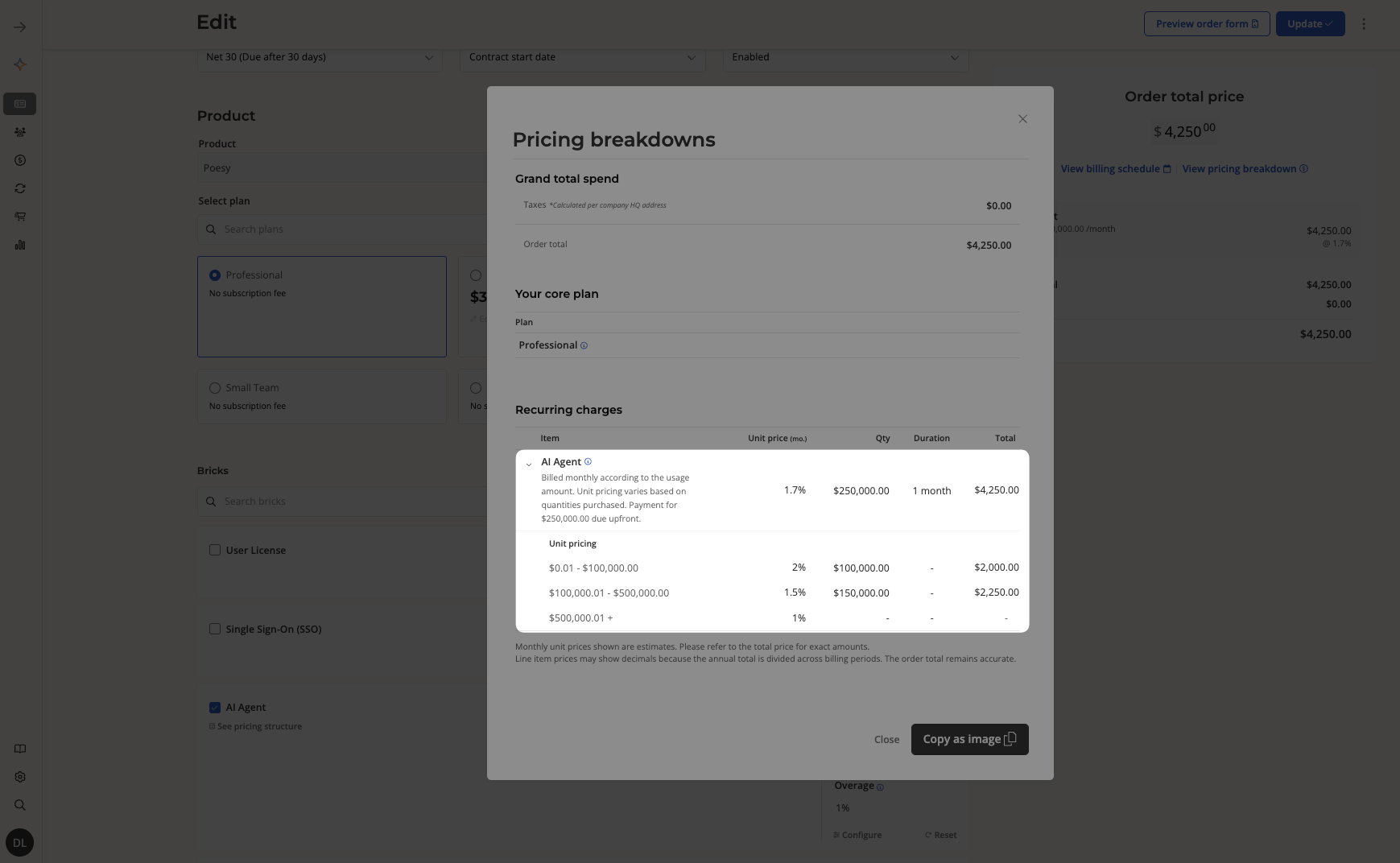
With a tiered structure, each band applies its own percentage to the portion of the amount that falls inside it.
| Band | Rate |
| ------------------------ | ----- |
| \$0 – \$100,000 | 2.00% |
| \$100,000.01 – \$500,000 | 1.50% |
| \$500,000.01 and up | 1.00% |
For \$250,000 of metered volume:
* \$100,000 × 2.00% = \$2,000.00
* \$150,000 × 1.50% = \$2,250.00
* **Total: \$4,250.00**
If you don't see a **Unit type** selector, monetary usage pricing isn't enabled for your account yet. Ping us in your dedicated Slack channel or email [support@salesbricks.com](mailto:support@salesbricks.com).
Choose **Flat-rate**, **Tiered**, or **Volume** (see [pricing structures](/quickstart-guide/products-plans-bricks/creating-a-plan#pricing-structures)), then enter the percentage rate. Fractional percentages are supported, so `1.39` is a valid rate.
For tiered and volume structures, the tier bounds are entered as dollar amounts rather than counts.
Save the brick pricing, then publish the plan version so the pricing is available to select on an order.
Monetary is not available with **Block** pricing. Block charges a flat fee per band rather than rate × quantity, so a percentage rate has nothing to multiply against. The two options disable each other in the modal, and the combination is rejected on save.
## Sending usage
Usage is always recorded in the **smallest denomination of the currency** (cents) through the same [usage endpoint](/api-reference/usage/post) you already use.
Salesbricks converts the stored count into a dollar amount for display, where **1 metered unit = 1 cent**.
| You want to record | Send as `quantity` |
| ------------------ | ------------------ |
| \$1,250.00 | `125000` |
| \$99.99 | `9999` |
| \$0.50 | `50` |
Sending `1250` when you meant \$1,250.00 records \$12.50. Double-check that your integration multiplies by 100 before posting.
## How the charge is calculated
The charge is the metered dollar amount multiplied by the rate.
**Charge = metered amount × (rate ÷ 100)**
**Flat-rate example**
* Metered amount for the month: \$250,000
* Rate: 1.39%
* Charge: \$250,000 × (1.39 ÷ 100) = **\$3,475.00**
**Tiered example**
With a tiered structure, each band applies its own percentage to the portion of the amount that falls inside it.
| Band | Rate |
| ------------------------ | ----- |
| \$0 – \$100,000 | 2.00% |
| \$100,000.01 – \$500,000 | 1.50% |
| \$500,000.01 and up | 1.00% |
For \$250,000 of metered volume:
* \$100,000 × 2.00% = \$2,000.00
* \$150,000 × 1.50% = \$2,250.00
* **Total: \$4,250.00**
 Alternatively: with a **volume** structure, the whole amount is priced at the rate of the band it lands in — \$250,000 × 1.50% = \$3,750.00.
## Where it appears
Choosing `Monetary` changes how the brick is presented everywhere the quantity or rate is shown:
* **Brick pricing modal**: the rate card renders as a Tier / Rate table with percentage rates, and tier bounds are entered as currency.
* **Order form pricing breakdown**: the breakdown interleaves the rate card with the distribution across bands, so the buyer sees which portion of the amount is priced at which percent.
* **Pre-commitments and overage**: a pre-committed amount is expressed in dollars, and the overage rate is entered as a percentage.
* **Ramping schedules**: each ramping period's committed amount and rate follow the same formatting.
* **Invoices and subscription management**: invoiced quantities and the usage charts display dollar amounts.
## Things to know
* **Unit type lives on the pricing, not the brick.** The same brick can be priced in whole units on one plan and monetary on another.
* **Percentage rates require a monetary unit type.** The two settings are validated together, so a percentage rate cannot be attached to a whole-units brick.
* **Metering and storage are unchanged.** Only entry and display differ, so switching an existing integration is a pricing change, not a data migration.
* **Pricing is set per plan version.** Changing a published brick's unit type means creating and publishing a new plan version; existing subscriptions keep the pricing they closed on.
## Related topics
- [Usage Alerts](/products/usage-alerts.md)
- [Creating a Brick](/quickstart-guide/products-plans-bricks/creating-a-brick.md)
- [Overview](/integrations/stripe/overview.md)
Alternatively: with a **volume** structure, the whole amount is priced at the rate of the band it lands in — \$250,000 × 1.50% = \$3,750.00.
## Where it appears
Choosing `Monetary` changes how the brick is presented everywhere the quantity or rate is shown:
* **Brick pricing modal**: the rate card renders as a Tier / Rate table with percentage rates, and tier bounds are entered as currency.
* **Order form pricing breakdown**: the breakdown interleaves the rate card with the distribution across bands, so the buyer sees which portion of the amount is priced at which percent.
* **Pre-commitments and overage**: a pre-committed amount is expressed in dollars, and the overage rate is entered as a percentage.
* **Ramping schedules**: each ramping period's committed amount and rate follow the same formatting.
* **Invoices and subscription management**: invoiced quantities and the usage charts display dollar amounts.
## Things to know
* **Unit type lives on the pricing, not the brick.** The same brick can be priced in whole units on one plan and monetary on another.
* **Percentage rates require a monetary unit type.** The two settings are validated together, so a percentage rate cannot be attached to a whole-units brick.
* **Metering and storage are unchanged.** Only entry and display differ, so switching an existing integration is a pricing change, not a data migration.
* **Pricing is set per plan version.** Changing a published brick's unit type means creating and publishing a new plan version; existing subscriptions keep the pricing they closed on.
## Related topics
- [Usage Alerts](/products/usage-alerts.md)
- [Creating a Brick](/quickstart-guide/products-plans-bricks/creating-a-brick.md)
- [Overview](/integrations/stripe/overview.md)